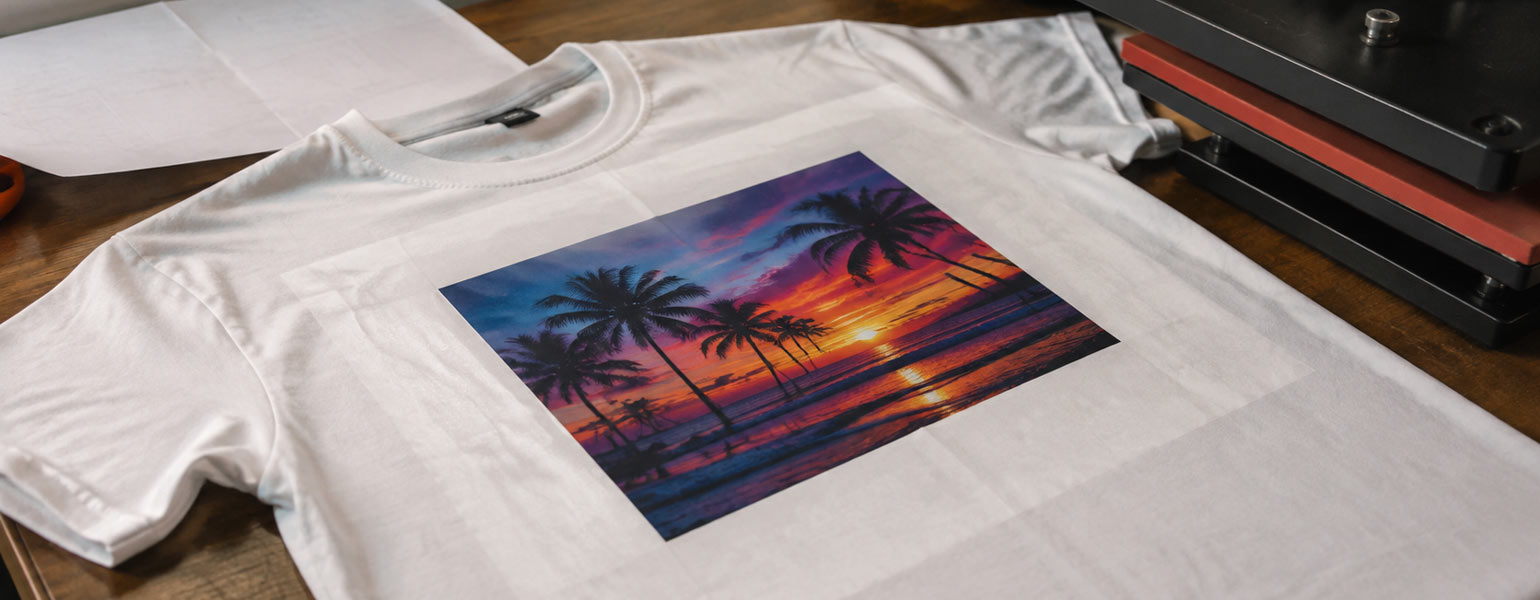
You have just finished pressing a T-shirt.
The sublimation design looks exactly how you hoped it would. The colours are bright, the details are sharp, and the print has transferred beautifully. At first glance, it feels like a perfect result.
Then you look closer.
Around the printed area, there are visible square marks. Some parts of the fabric look slightly shiny, while other areas seem flatter than before. The design itself is fine, but the T-shirt has that obvious “heat press mark” that makes it look less professional.
This is a frustrating moment, especially for beginners. However, even experienced printers occasionally run into these same issues. Heat press marks are a normal part of learning and improving your process, so don’t be discouraged if they happen—everybody encounters them at some point.
The good news is that this is a very common issue in the UK sublimation industry, particularly among DIY makers, Etsy sellers and small printing studios. In most cases, the problem is not your sublimation paper or ink. It is usually caused by how heat, pressure, and fabric interact during the pressing process.
So why does your heat press leave marks, and what can you do to prevent them?
Heat Press Marks Are More Common Than You Think
When people first start sublimation printing, there are two common assumptions:
“More heat means better colours.”
“Longer pressing time means a stronger transfer.”
It sounds logical, but sublimation does not quite work that way.
Sublimation is a balance between temperature, time and pressure. Pushing one setting too far can create new problems, even if the print itself looks excellent.
Many beginners focus only on the image quality. They check whether the colours have transferred correctly but forget to inspect the fabric around the design.
That is where heat press marks usually appear.
Why Does a Heat Press Leave Marks on T-Shirts?
There are several reasons why your heat press may leave visible marks. Understanding the cause is the first step towards fixing the problem.
1. Too Much Pressure Is Flattening the Fabric
One of the most common causes of heat press marks is excessive pressure.
Many beginners believe that a stronger press will help the ink transfer better. In reality, sublimation does not require extreme pressure. Too much pressure can compress the fibres of the fabric, leaving behind a noticeable square shape from the heat press plate.
This is especially common with polyester T-shirts, sportswear and lightweight performance fabrics.
The result is often:
- Flattened fabric texture
- Shiny areas around the design
- A visible outline of the heat press area
A professional-looking print can quickly lose its quality because of this small detail.
How to fix
Try reducing the pressure setting.
For most sublimation T-shirts, medium pressure is usually enough. The heat press should close firmly, but it should not feel like you are forcing the machine shut.
If you are using a manual heat press, small adjustments can make a big difference.
2. The Temperature Is Too High or Pressing Time Is Too Long
Another common mistake is thinking that higher temperatures create brighter colours.
In reality, excessive heat can damage the fabric surface.
Polyester fibres react to high temperatures. When heated for too long, they can become compressed or slightly melted, creating a shiny appearance or a visible press mark.
For example, many beginners start with settings like:
- 200°C
- 60 seconds
- Heavy pressure
because these numbers are commonly shared online.
However, different fabrics and blanks behave differently. A lightweight polyester shirt may need a completely different setting from a thicker polyester hoodie.
How to fix
Always follow the recommended settings from your blank supplier first.
If you notice heat press marks, try:
- Reducing the temperature slightly
- Reducing the pressing time
- Testing on a spare garment before production
Sometimes a small change, such as reducing the temperature by 5–10°C, can completely remove the problem.
3. Polyester Fabric Can Develop Shiny Heat Marks
This is one of the most confusing issues for new sublimation users.
The print looks perfect, but the surrounding area has a strange glossy finish.
This happens because polyester fibres can change under heat. The pressure from the heat press can flatten the surface, making some areas reflect light differently.
Dark-coloured polyester garments are usually more likely to show this problem.
A black or navy T-shirt might look completely normal before pressing but show a visible rectangular mark afterwards.
How to fix
There are several ways to reduce this issue:
- Use the correct pressure setting
- Avoid unnecessary pressing time
- Place a protective sheet between the heat plate and garment
- Pre-test different polyester fabrics before large orders
Sometimes the easiest solution is simply choosing a better-quality sublimation blank with a suitable fabric finish.
4. Skipping Protective Paper Can Leave Unwanted Marks
Protective paper is a small detail that many beginners overlook.
During sublimation, ink vapour and residue can transfer onto your heat press plate. If you continue pressing without protection, those residues may affect future garments.
It can also create uneven pressure marks or unwanted stains.
A simple setup can help:
- Protective paper on top of the garment
- Sublimation paper underneath
- Clean heat press surface before use
This takes only a few seconds but can save a lot of frustration.
5. Moisture in the Fabric Can Cause Uneven Results
The UK climate can make this problem more noticeable.
Polyester fabrics and sublimation blanks can absorb moisture from the air, especially during colder or wetter months. When the garment is pressed, trapped moisture turns into steam and can affect the transfer process.
You may notice:
- Water marks
- Uneven colours
- Slight printing defects
How to fix
Before printing, try pre-pressing the garment for a few seconds.
This helps remove moisture and also smooths out wrinkles, creating a better surface for sublimation.
It is a simple step, but many experienced printers still do it every time.
A Better Way to Avoid Heat Press Marks
After helping many beginners troubleshoot sublimation problems, the biggest lesson is this:
Do not chase stronger settings. Chase consistency.
A good sublimation result comes from finding the right balance.
Before pressing a full batch of T-shirts, it is worth testing:
- Different pressure levels
- Different polyester fabrics
- Slight temperature adjustments
- Different pressing times
Keeping a small notebook of successful settings can save hours later, especially when working with multiple products.
Final Tips for Better Sublimation Printing
Heat press marks can be annoying, but they are usually easy to prevent once you understand what causes them.
Remember:
- More pressure does not always mean better results
- Higher temperatures do not always create brighter colours
- Longer pressing times can damage fabric quality
- Every sublimation blank may require slightly different settings
For DIY makers and small UK printing businesses, small improvements in the pressing process can make a big difference. A clean, professional finish is often created by controlling the small details.
At Signzworld, we support sublimation creators with a wide range of sublimation products, including sublimation mugs, T-shirt blanks, heat press machines, sublimation paper, inks and other printing accessories. Whether you are starting your first home printing project or running a growing small studio, choosing reliable equipment and materials is an important part of achieving consistent results.