A few years ago, most people buying a cutter plotter for HTV were asking pretty simple questions.
Can it cut vinyl?
Does it work with heat transfer film?
Will it connect to my computer without driving me insane?
That was enough.
But the HTV industry has changed fast. Very fast.
Now people are selling highly detailed chest logos, oversized back prints, layered sportswear graphics, tiny sleeve tags, microtext, and intricate single-colour artwork that would have looked impossible on hobby cutters ten years ago. Designs are getting thinner, smaller, and more complex. At the same time, customers expect cleaner results and faster turnaround.
And that shift has completely changed the conversation around cutter plotters.
The industry is no longer focused on whether a machine can cut HTV at all. The real discussion now is about precision, tracking accuracy, consistency, and how cleanly a machine handles difficult designs.
If you spend time on Reddit, Facebook groups, or print forums lately, you will notice the same complaints showing up again and again:
“My machine skips small letters.”
“The inside of the text didn’t cut through.”
“Weeding this nearly destroyed the design.”
“Thin lines keep lifting during the weeding.”
“It cuts perfectly one day and horribly the next.”
Some people assume the HTV is bad. Others blame the cutter immediately. Sometimes they are right. Sometimes they are not.
The truth is that clean HTV cutting is usually a combination of several small factors stacking together. One weak point in the workflow can ruin the entire job.
And unfortunately, modern designs expose those weak points very quickly.
Why Small HTV Designs Fail So Often
This is probably the biggest change in the industry right now.
Design trends used to favor larger shapes and bold lettering. Easy to cut. Quick to weed. Easy to press.
Now everybody wants ultra-clean minimalist graphics, tiny details, narrow fonts, handwritten scripts, layered effects, and micro outlines.
Looks amazing on screen.
Not always amazing on vinyl.
The problem is that HTV is still a physical material. It stretches slightly. It moves slightly. Blade holders have tiny tolerances. Roll feed systems drift. Cheap pinch rollers wobble. Even static electricity can affect light materials sometimes.
When you try cutting tiny text at high speed with aggressive force settings, all those tiny imperfections suddenly matter.
A machine that seems perfectly fine on larger graphics can completely fall apart on detailed work.
That is why people often say:
“My cutter works great except for small designs.”
That “except” is the entire difference between entry-level cutting and professional-level cutting.
The Tiny Text Problem Nobody Talks About Enough
Small lettering is where many cutter plotters get exposed.
Especially script fonts, thin sans-serif fonts and trendy luxury-style branding fonts.
A design may look sharp inside Illustrator or CorelDRAW, but once it reaches actual HTV material, reality hits.
Many users notice problems like:
- Corners not closing
- Inner sections are not cutting fully
- Random dragging
- Letters lifted during weeding
- Fine lines are tearing apart
- Shapes becoming distorted
Then comes the worst part.
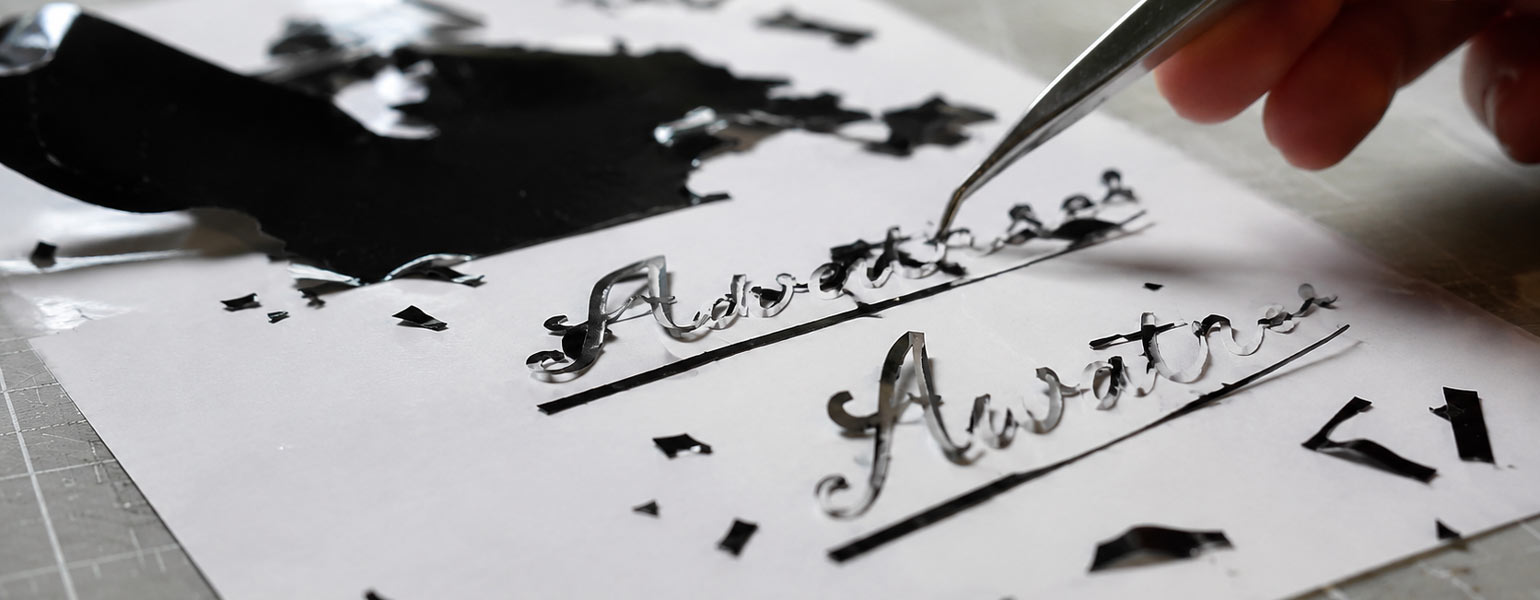
Weeding.
You finally peel the excess HTV, and suddenly half the letter comes up with it.
Now the design is ruined.
Again.
This is one of the biggest frustrations in the HTV industry because it wastes both time and material. And if you are running customer orders, it also destroys production efficiency.
Blade Depth Is Still One of the Most Common Mistakes
People constantly overexpose the blade.
This happens everywhere.
A lot of beginners think that more blade exposure equals better cutting.
Usually, the opposite happens.
Too much blade sticking out creates drag. The blade starts pulling material instead of slicing cleanly. Corners become messy. Small text starts lifting. Thin lines distort.
In severe cases, the blade literally behaves like a tiny plough.
For HTV, the blade should barely be visible.
A good rule is simple:
You should cut the vinyl cleanly without deeply cutting the carrier sheet underneath.
If your backing sheet looks heavily scored after every cut, your blade depth is probably too aggressive.
This single adjustment solves a shocking number of cutting problems.
Speed Is Destroying Your Detail Work
Another common issue is cutting too fast.
People buy a faster machine and immediately run everything at maximum speed because it feels productive.
But the HTV detail work is not racing.
Small letters and intricate shapes need controlled movement. The blade has to swivel correctly at every angle change. If the carriage moves too aggressively, corners become inaccurate and tiny shapes lose definition.
This is especially obvious with:
- Small script fonts
- Sharp corners
- Thin outlines
- Layered designs
- Complex logos
Sometimes, slowing a machine from 700mm/s down to 200mm/s completely changes the result.
Professional operators know this already.
Fast for large graphics.
Slow for precision.
Cheap Blades Cause More Problems Than People Realize
A dull blade does not always look dull.
That is what tricks people.
The machine still cuts. Just badly.
Users start changing force settings, software settings, speed settings, pressure settings, and even artwork settings, when the real problem is simply a worn blade.
HTV cutting requires clean, controlled edges. Once the blade edge degrades, small details become inconsistent very quickly.
And cheap blades often wear down faster than people expect.
Particularly with:
- Glitter HTV
- Reflective HTV
- Flock HTV
- Thick speciality materials
A worn blade creates dragging and incomplete cuts that become obvious during weeding.
If weeding suddenly becomes harder for no apparent reason, always inspect the blade before changing everything else.
Dirty Blade Holders Quietly Ruin Accuracy
This is one of the most overlooked maintenance issues.
Blade holders collect tiny vinyl particles, adhesive dust, and debris over time. Eventually the blade cannot rotate smoothly anymore.
When that happens:
- Corners stop closing properly
- Curves become rough
- Small shapes distort
- Random incomplete cuts appear
The frustrating part is that the issue looks like a software failure or machine calibration problems.
Meanwhile, the blade holder simply needs cleaning.
Experienced operators usually clean holders regularly because precision cutting depends on smooth blade rotation.
Especially when doing detailed HTV work daily.
Tracking Problems Become Obvious on Longer Jobs
A cutter can appear accurate on small logos but fail badly on larger production runs.
This is where tracking quality matters.
Poor tracking causes material drift during feeding. The further the material travels, the worse the alignment becomes.
Then you start seeing:
- Crooked cuts
- Misaligned rows
- Uneven spacing
- Distorted graphics
Cheap pinch rollers and weak feeding systems struggle here.
That is why commercial cutter plotters often emphasise tracking accuracy so heavily.
Because in real production environments, consistency matters more than peak speed.
A machine that cuts slightly slower but tracks perfectly usually saves far more money in wasted material.
Why Weeding Sometimes Feels Impossible
Weeding difficulty is often a symptom, not the root problem.
People blame the HTV immediately when weeding becomes frustrating, but many cases actually begin earlier during cutting.
Poor cuts create weak edges.
Weak edges create lifting.
Lifting destroys small details.
Then the weeding turns into a nightmare.
Some common reasons include:
Incomplete corner cuts
Tiny gaps remain connected, so letters tear during peeling.
Excessive force
Cuts become too deep and distort the vinyl shape.
Overheated storage environments
HTV adhesive behavior changes when materials are stored poorly.
Low-quality artwork
Bad vector paths create unnecessary complexity.
Tiny unnecessary details
Some designs simply are not practical for HTV.
This last point matters more than many designers want to admit.
Not every digital design should become cut vinyl.
The “Looks Fine on Screen” Trap
Design software hides problems beautifully.
Zoomed-in artwork can look perfect while still being terrible for production.
A common example is ultra-thin script text.
Looks elegant digitally.
Cuts horribly physically.
Experienced HTV operators constantly simplify artwork before cutting.
Sometimes slightly thickening a font by a tiny amount completely transforms weeding performance.
Same design.
Much better production result.
This is something newer users usually learn the hard way after wasting several sheets of HTV.
Offset Settings Can Quietly Ruin Small Details
Blade offset settings matter more than many beginners realize.
If the offset is incorrect:
- Corners overshoot
- Shapes round incorrectly
- Tiny gaps appear
- Fine details deform
On large graphics, you may barely notice.
On small text, it becomes painfully obvious.
This is why detailed HTV work requires calibration patience.
Not just machine power.
Static Electricity Is Weirdly Real
People laugh at this until they experience it.
Static can absolutely affect lightweight vinyl handling, especially in dry environments.
You may notice:
- Random feeding inconsistencies
- Material shifting slightly
- Strange cutting behavior
Professional shops sometimes use anti-static measures for this reason.
Not glamorous.
But real.
Why Hobby Machines Struggle With Production Work
A lot of modern HTV sellers start with hobby cutters.
Nothing wrong with that.
But eventually, people hit a wall.
The machine works fine for occasional shirts, then suddenly struggles when handling:
- Daily orders
- Long runs
- Tiny lettering
- Repeated precision cuts
- Thick specialty HTV
That is usually when users begin upgrading toward higher-end cutter plotters with better motors, stronger tracking systems, improved blade control, and more stable feeding accuracy.
Because once production volume increases, consistency becomes everything.
Practical Fixes That Actually Help
Instead of endlessly changing random settings, work through problems methodically.
Slow down detailed jobs
This alone fixes many small-text issues.
Reduce blade exposure
Fewer blades are usually better.
Replace worn blades earlier
Do not wait until cuts become terrible.
Clean blade holders regularly
Especially after glitter or specialty HTV.
Use better vector artwork
Simplify unnecessary details.
Increase font thickness slightly
Tiny adjustments massively improve weeding.
Test every new material
Different HTV behaves differently.
Store HTV properly
Humidity and heat affect material performance more than people think.
Use quality cutting mats or stable roll feeding
Movement kills precision.
Match blade type to material
Standard blades are not ideal for every specialty HTV.
Common Cutter Plotter FAQ
Why does my HTV cut through the backing sheet?
Usually too much blade depth or excessive force.
Why are small letters lifting during weeding?
Often incomplete cuts, dull blades, excessive speed, or overly thin fonts.
Why does the cutter miss parts of letters?
Blade holder issues, incorrect offset, or poor vector paths are common causes.
Why does detailed artwork weed terribly?
The design may simply be too delicate for HTV production at that size.
Why do corners look rounded instead of sharp?
Incorrect blade offset or excessive cutting speed.
Why does the machine cut inconsistently every day?
Blade wear, dirty holders, material variation, or unstable feeding systems.
Why does my vinyl shift sideways during long cuts?
Tracking problems or poor pinch roller pressure.
Why do professional cutters cost so much more?
Mostly because of consistency, tracking accuracy, motor precision, and long-term stability.
The Industry Is Clearly Moving Toward Precision
The HTV world is becoming more demanding every year.
Customers expect cleaner detail.
Designs are becoming more complex.
Production timelines are tighter.
And because of that, cutter plotters are no longer judged simply by whether they can cut vinyl.
People now care about:
- detail accuracy
- tracking performance
- smooth weeding
- repeatability
- workflow efficiency
That is the real direction of the industry now.
The difference between a frustrating HTV workflow and a smooth one often comes down to dozens of tiny details working together properly.
Blade setup.
Material handling.
Cutting speed.
Design preparation.
Machine stability.
None of them sounds dramatic individually.
Together, they decide whether a job feels effortless or turns into a two-hour battle with shredded vinyl.
For businesses handling regular HTV production, investing in reliable equipment and properly matched materials makes a huge difference over time. Companies like Signzworld have been part of that conversation for years, supplying cutter plotters, HTV materials, and production equipment used by both small custom shops and growing print businesses across the UK.